| Safe Haskell | None |
|---|---|
| Language | Haskell2010 |
Text.AsciiDiagram
Description
This module gives access to the ascii diagram parser and SVG renderer.
Ascii diagram, transform your ASCII art drawing to a nicer representation
                /---------+
+---------+     |         |
|  ASCII  +---->| Diagram |
+---------+     |         |
|{flat}   |     +--+------/
\---*-----/<=======/
::: .flat { fill: #DDD; }
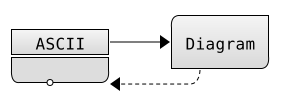
To render the diagram as a PNG file, you have to use the library rasterific-svg and JuicyPixels.
As a sample usage, to save a diagram to png, you can use the following snippet.
 import Codec.Picture( writePng )
 import Text.AsciiDiagram( imageOfDiagram )
 import Graphics.Rasterific.Svg( loadCreateFontCache )

 saveDiagramToFile :: FilePath -> Diagram -> IO ()
 saveDiagramToFile path diag = do
   cache <- loadCreateFontCache "asciidiagram-fonty-fontcache"
   imageOfDiagram cache 96 diag
   writePng path img
- svgOfDiagram :: Diagram -> Document
- parseAsciiDiagram :: Text -> Diagram
- saveAsciiDiagramAsSvg :: FilePath -> Diagram -> IO ()
- imageOfDiagram :: FontCache -> Dpi -> Diagram -> IO (Image PixelRGBA8)
- data Diagram = Diagram {
- _diagramShapes :: Set Shape
- _diagramTexts :: [TextZone]
- _diagramCellWidth :: !Int
- _diagramCellHeight :: !Int
- _diagramStyles :: [Text]
- data TextZone = TextZone {}
- data Shape = Shape {
- shapeElements :: [ShapeElement]
- shapeIsClosed :: Bool
- shapeTags :: Set Text
- data ShapeElement
- data Anchor
- data Segment = Segment {
- _segStart :: !Point
- _segEnd :: !Point
- _segKind :: !SegmentKind
- _segDraw :: !SegmentDraw
- data SegmentKind
- data SegmentDraw
- type Point = V2 Int
Lines
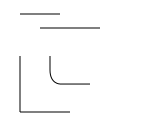
The basic syntax of asciidiagrams is made of lines made outnof '-' and '|' characters. They can be connected with anchorsnlike '+' (direct connection) or '\' and '/' (smooth connections)n
-----
  -------

|  |
|  |
|  \----
|
+-----
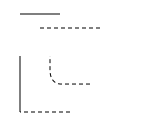
You can use dashed lines by using : for vertical lines or '=' fornhorizontal lines.
 -----
   -=-----

 |  :
 |  |
 |  \----
 |
 +--=--
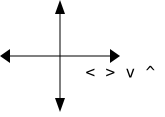
Arrows are made out of the '<', '>', '^' and 'v'ncharacters.nIf the arrows are not connected to any lines, the text is left as is.n
     ^
     |
     |
<----+---->
     |  < > v ^
     |
     v
Shapes
If the lines are closed, then it is detected as such and rendered differently
  +------+
  |      |
  |      +--+
  |      |  |
  +---+--+  |
      |     |
      +-----+
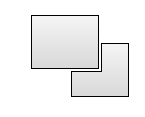
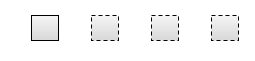
If any of the segment posess one of the dashing markers (':' or '=') Then the full shape will be dashed.
  +--+  +--+  +=-+  +=-+
  |  |  :  |  |  |  |  :
  +--+  +--+  +--+  +-=+
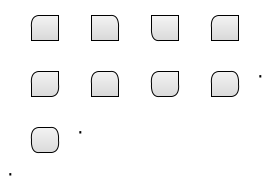
Any of the angle of a shape can curved one of the smooth corner anchor ('\' or '/')
  /--+  +--\  +--+  /--+
  |  |  |  |  |  |  |  |
  +--+  +--+  \--+  +--+

  /--+  /--\  /--+  /--\ .
  |  |  |  |  |  |  |  |
  +--/  +--+  \--/  +--/

  /--\ .
  |  |
  \--/
.
Bullets
Adding a '*' on a line or on a shape add a little circle on it. If the bullet is not attached to any shape or lines, then it will be render like any other text.
  *-*-*
  |   |  *----*
  +---/       |
          * * *
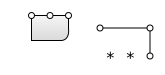
When used at connection points, it behaves like the '+' anchor.
Styles
The shapes can ba annotated with a tag like `{tagname}`. Tags will be inserted in the class attribute of the shape and can then be stylized with a CSS.
 +--------+         +--------+
 | Source +-------->| op1    |
 | {src}  |         \---+----/
 +--------+             |
            +-------*<--/
 +------+<--| op2   |
 | Dest |   +-------+
 |{dst} |
 +------+

::: .src { fill: #AAF; }
::: .dst { stroke: #FAA; stroke-width: 3px; }
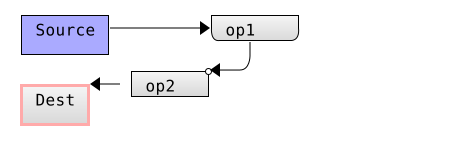
Inline css styles are introduced with the ":::" prefix at the beginning of the line. They are introduced in the style section of the generated CSS file
The generated geometry also possess some predefined class which are overidable:
dashed_elemis applyied on every dashed element.filled_shapeis applyied on every closed shape.bulleton every bullet placed on a shape or line.line_elementon every line element, this include the arrow head.
You can then customize the appearance of the diagram as you want.
Usage example
Functions
svgOfDiagram :: Diagram -> Document Source
Transform an Ascii diagram to a SVG document which can be saved or converted to an image.
parseAsciiDiagram :: Text -> Diagram Source
Analyze an ascii diagram and extract all it's features.
saveAsciiDiagramAsSvg :: FilePath -> Diagram -> IO () Source
Helper function helping you save a diagram as a SVG file on disk.
imageOfDiagram :: FontCache -> Dpi -> Diagram -> IO (Image PixelRGBA8) Source
Render a Diagram as an image. a good value for the Dpi is 96. The IO dependency is there to allow loading of the font files used in the document.
Document description
Describe the geomtry of a full Ascii Diagram document
Constructors
| Diagram | |
Fields
| |
Describe where to place a text snippet.
Constructors
| TextZone | |
Fields | |
Shape extracted from the text
Constructors
| Shape | |
Fields
| |
data ShapeElement Source
Describe a composant of shapes. Can be composed of anchors like "+*/\" or segments.
Constructors
| ShapeAnchor !Point !Anchor | |
| ShapeSegment !Segment |
Instances
Define the different connection points between the segments.
Constructors
| AnchorMulti | Associated to |
| AnchorFirstDiag | Associated to |
| AnchorSecondDiag | Associated to '\' |
| AnchorPoint | Kind of "end anchor", without continuation. |
| AnchorBullet | Used as a |
| AnchorArrowUp | Associated to |
| AnchorArrowDown | Associated to |
| AnchorArrowLeft | Associated to |
| AnchorArrowRight | Associated to |
Define an horizontal or vertical segment.
Constructors
| Segment | |
Fields
| |
data SegmentKind Source
Helper data for segment composed of only one character
Constructors
| SegmentHorizontal | |
| SegmentVertical |
Instances
data SegmentDraw Source
Differentiate between elements drawn with a solid line or with dashed lines.
Constructors
| SegmentSolid | |
| SegmentDashed |
Instances