| Copyright | (c) Alexey Kuleshevich 2016 |
|---|---|
| License | BSD3 |
| Maintainer | Alexey Kuleshevich <lehins@yandex.ru> |
| Stability | experimental |
| Portability | non-portable |
| Safe Haskell | None |
| Language | Haskell2010 |
Graphics.Image
Contents
Description
Haskell Image Processing (HIP) library is a wrapper around any array like data structure and is fully agnostic to the underlying representation. All of the functionality in this library relies upon a few type classes, which corresponding representation types are instances of:
Arrayarr cs eImagearrcse, wherearrstands for an underlying array representation,csis theColorSpaceof an image andeis the type denoting precision of an image (Int,Word,Double, etc.) .MArrayarr cs eMImagestarrcse, which isImage's mutable cousin.
Array representation type and the above classes it is installed in determine operations that can be done on the image with that representation.
Representations using Vector and Repa packages:
VU- Vector Unboxed representation.VS- Vector Storable representation.RSU- Repa Sequential Unboxed array representation (computation is done sequentially).RPU- Repa Parallel Unboxed array representation (computation is done in parallel).RSS- Repa Sequential Storable array representation (computation is done sequentially).RPS- Repa Parallel Storable array representation (computation is done in parallel).
Images with RSU and RPU types, most of the time hold functions rather then
actual data, this way computation can be fused together, and later changed to
VU using toManifest, which in turn performs the fused computation. If at
any time computation needs to be forced, compute can be used for that
purpose.
Many of the function names exported by this module will clash with the ones from Prelude, hence it can be more convenient to import like this:
import Prelude as P
import Graphics.Image as I
- makeImageR :: Array arr cs Double => arr -> (Int, Int) -> ((Int, Int) -> Pixel cs Double) -> Image arr cs Double
- makeImage :: Array arr cs e => (Int, Int) -> ((Int, Int) -> Pixel cs e) -> Image arr cs e
- fromListsR :: Array arr cs e => arr -> [[Pixel cs e]] -> Image arr cs e
- fromLists :: Array arr cs e => [[Pixel cs e]] -> Image arr cs e
- toLists :: MArray arr cs e => Image arr cs e -> [[Pixel cs e]]
- readImageY :: Array arr Y Double => arr -> FilePath -> IO (Image arr Y Double)
- readImageYA :: Array arr YA Double => arr -> FilePath -> IO (Image arr YA Double)
- readImageRGB :: Array arr RGB Double => arr -> FilePath -> IO (Image arr RGB Double)
- readImageRGBA :: Array arr RGBA Double => arr -> FilePath -> IO (Image arr RGBA Double)
- readImageExact :: Readable (Image arr cs e) format => format -> FilePath -> IO (Either String (Image arr cs e))
- writeImage :: (Array VS cs e, Array arr cs e, Exchangable arr VS, Writable (Image VS cs e) OutputFormat) => FilePath -> Image arr cs e -> IO ()
- writeImageExact :: Writable (Image arr cs e) format => format -> [SaveOption format] -> FilePath -> Image arr cs e -> IO ()
- displayImage :: (Array VS cs e, Array arr cs e, Exchangable arr VS, Writable (Image VS cs e) TIF) => Image arr cs e -> IO ()
- rows :: BaseArray arr cs e => Image arr cs e -> Int
- cols :: BaseArray arr cs e => Image arr cs e -> Int
- dims :: BaseArray arr cs e => Image arr cs e -> (Int, Int)
- index :: MArray arr cs e => Image arr cs e -> (Int, Int) -> Pixel cs e
- maybeIndex :: MArray arr cs e => Image arr cs e -> (Int, Int) -> Maybe (Pixel cs e)
- defaultIndex :: MArray arr cs e => Pixel cs e -> Image arr cs e -> (Int, Int) -> Pixel cs e
- borderIndex :: MArray arr cs e => Border (Pixel cs e) -> Image arr cs e -> (Int, Int) -> Pixel cs e
- map :: (Array arr cs e, Array arr cs' e') => (Pixel cs' e' -> Pixel cs e) -> Image arr cs' e' -> Image arr cs e
- imap :: (Array arr cs e, Array arr cs' e') => ((Int, Int) -> Pixel cs' e' -> Pixel cs e) -> Image arr cs' e' -> Image arr cs e
- zipWith :: (Array arr cs e, Array arr cs1 e1, Array arr cs2 e2) => (Pixel cs1 e1 -> Pixel cs2 e2 -> Pixel cs e) -> Image arr cs1 e1 -> Image arr cs2 e2 -> Image arr cs e
- izipWith :: (Array arr cs e, Array arr cs1 e1, Array arr cs2 e2) => ((Int, Int) -> Pixel cs1 e1 -> Pixel cs2 e2 -> Pixel cs e) -> Image arr cs1 e1 -> Image arr cs2 e2 -> Image arr cs e
- traverse :: (Array arr cs e, Array arr cs' e') => Image arr cs' e' -> ((Int, Int) -> (Int, Int)) -> (((Int, Int) -> Pixel cs' e') -> (Int, Int) -> Pixel cs e) -> Image arr cs e
- traverse2 :: (Array arr cs e, Array arr cs1 e1, Array arr cs2 e2) => Image arr cs1 e1 -> Image arr cs2 e2 -> ((Int, Int) -> (Int, Int) -> (Int, Int)) -> (((Int, Int) -> Pixel cs1 e1) -> ((Int, Int) -> Pixel cs2 e2) -> (Int, Int) -> Pixel cs e) -> Image arr cs e
- transpose :: Array arr cs e => Image arr cs e -> Image arr cs e
- backpermute :: Array arr cs e => (Int, Int) -> ((Int, Int) -> (Int, Int)) -> Image arr cs e -> Image arr cs e
- (|*|) :: Array arr cs e => Image arr cs e -> Image arr cs e -> Image arr cs e
- fold :: Array arr cs e => (Pixel cs e -> Pixel cs e -> Pixel cs e) -> Pixel cs e -> Image arr cs e -> Pixel cs e
- sum :: Array arr cs e => Image arr cs e -> Pixel cs e
- product :: Array arr cs e => Image arr cs e -> Pixel cs e
- maximum :: (Array arr cs e, Ord (Pixel cs e)) => Image arr cs e -> Pixel cs e
- minimum :: (Array arr cs e, Ord (Pixel cs e)) => Image arr cs e -> Pixel cs e
- normalize :: (Array arr cs e, Array arr Gray e, Fractional e, Fractional (Pixel cs e), Ord e) => Image arr cs e -> Image arr cs e
- exchange :: (Exchangable arr' arr, Array arr' cs e, Array arr cs e) => arr -> Image arr' cs e -> Image arr cs e
Color Space
Here is a list of default Pixels with their respective constructors:
*PixelYe = PixelY y - Luma, also commonly denoted as Y'. *PixelYAe = PixelYA y a - Luma with alpha. *PixelRGBe = PixelRGB r g b - Red, Green and Blue. *PixelRGBAe = PixelRGBA r g b a - RGB with alpha *PixelHSIe = PixelHSI h s i - Hue, Saturation and Intensity. *PixelHSIAe = PixelHSIA h s i a - HSI with alpha *PixelCMYKe = PixelCMYK c m y k - Cyan, Magenta, Yellow and Key (Black). *PixelCMYKAe = PixelCMYKA c m y k a - CMYK with alpha. *PixelYCbCre = PixelYCbCr y cb cr - Luma, blue-difference and red-difference chromas. *PixelYCbCrAe = PixelYCbCrA y cb cr a - YCbCr with alpha. ------------------------------------------------------------------------------------------ *PixelBinaryBit=on|off- Bi-tonal. *Pixelcs (Complexe) = (Pixelcs e)+:(Pixelcs e) - Complex pixels with any color space. *PixelGraye = PixelGray g - Used for separating channels from other color spaces.
Every Pixel is an instance of Functor, Applicative, Foldable and
Num, as well as Floating and Fractional if e is also an instance.
All of the functionality related to every ColorSpace is re-exported by
Graphics.Image.Types module.
Creation
Arguments
| :: Array arr cs Double | |
| => arr | Underlying image representation. |
| -> (Int, Int) | ( |
| -> ((Int, Int) -> Pixel cs Double) | A function that takes ( |
| -> Image arr cs Double |
Create an image with a specified representation and pixels of Double
precision. Note, that it is essential for Double precision pixels to keep values
normalized in the [0, 1] range in order for an image to be written to file
properly.
>>>let grad_gray = makeImageR VU (200, 200) (\(i, j) -> PixelY (fromIntegral i) / 200 * (fromIntegral j) / 200)
Because all Pixels and Images are installed into Num, above is equivalent to:
>>>let grad_gray = makeImageR RPU (200, 200) (\(i, j) -> PixelY $ fromIntegral (i*j)) / (200*200)>>>writeImage "images/grad_gray.png" grad_gray
Creating color images is just as easy.
>>>let grad_color = makeImageR VU (200, 200) (\(i, j) -> PixelRGB (fromIntegral i) (fromIntegral j) (fromIntegral (i + j))) / 400>>>writeImage "images/grad_color.png" grad_color


makeImage :: Array arr cs e => (Int, Int) -> ((Int, Int) -> Pixel cs e) -> Image arr cs e Source #
Create an Image by supplying it's dimensions and a pixel generating function.
fromListsR :: Array arr cs e => arr -> [[Pixel cs e]] -> Image arr cs e Source #
Type restricted version of fromLists that constructs an image using
supplied representation.
fromLists :: Array arr cs e => [[Pixel cs e]] -> Image arr cs e Source #
Construct an image from a nested rectangular shaped list of pixels.
Length of an outer list will constitute m rows, while the length of inner lists -
n columns. All of the inner lists must be the same length and greater than 0.
>>>fromLists [[PixelY (fromIntegral (i*j) / 60000) | j <- [1..300]] | i <- [1..200]]<Image VectorUnboxed Y (Double): 200x300>

toLists :: MArray arr cs e => Image arr cs e -> [[Pixel cs e]] Source #
Generates a nested list of pixels from an image.
img == fromLists (toLists img)
IO
Reading
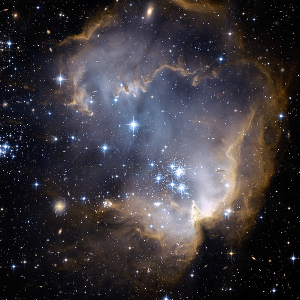
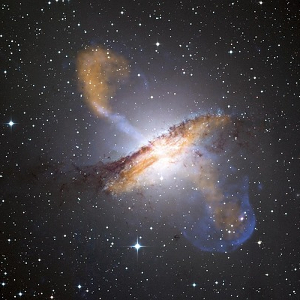
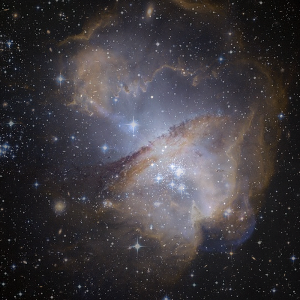
Read supported files into an Image with pixels in Double
precision. In order to read an image in a different representation, color
space or precision, use readImage or readImageExact from
Graphics.Image.IO instead. While reading an
image, it's underlying representation can be specified by passing one of
VU, RSU or RPU as the first argument to readImage* functions. Here is
a quick demonstration of how two images can be read as different
representations and later easily combined as their average.
>>>cluster <- readImageRGB RPU "images/cluster.jpg">>>displayImage cluster>>>centaurus <- readImageRGB VU "images/centaurus.jpg">>>displayImage centaurus>>>displayImage ((cluster + exchange RPU centaurus) / 2)
readImageY :: Array arr Y Double => arr -> FilePath -> IO (Image arr Y Double) Source #
Read image as luma (brightness).
readImageYA :: Array arr YA Double => arr -> FilePath -> IO (Image arr YA Double) Source #
Read image as luma with Alpha channel.
readImageRGB :: Array arr RGB Double => arr -> FilePath -> IO (Image arr RGB Double) Source #
Read image in RGB colorspace.
readImageRGBA :: Array arr RGBA Double => arr -> FilePath -> IO (Image arr RGBA Double) Source #
Read image in RGB colorspace with Alpha channel.
Arguments
| :: Readable (Image arr cs e) format | |
| => format | A file format that an image should be read as. See Supported Image Formats |
| -> FilePath | Location of an image. |
| -> IO (Either String (Image arr cs e)) |
This function allows for reading any supported image in the exact colorspace
and precision it is currently encoded in. For instance, frog image can be
read into it's YCbCr colorspace with
Word8 precision and into any supported array
representation.
>>>readImageExact JPG "images/frog.jpg" :: IO (Either String (Image RP YCbCr Word8))Right <Image RepaParallel YCbCr (Word8): 200x320>
The drawback here is that colorspace and precision has to match exactly, otherwise it will return an error:
>>>readImageExact JPG "images/frog.jpg" :: IO (Either String (Image RP RGB Word8))Left "JuicyPixel decoding error: Input image is in YCbCr8 (Pixel YCbCr Word8), cannot convert it to RGB8 (Pixel RGB Word8) colorspace."
Attempt to read an image in a particular color space that is not supported by
the format, will result in a compile error. Refer to Readable class for all
images that can be decoded.
Writing
Arguments
| :: (Array VS cs e, Array arr cs e, Exchangable arr VS, Writable (Image VS cs e) OutputFormat) | |
| => FilePath | Location where an image should be written. |
| -> Image arr cs e | An image to write. |
| -> IO () |
Just like readImage, this function will guess an output file format from the
extension and write to file any image that is in one of Y, YA, RGB or
RGBA color spaces with Double precision. While doing necessary
conversions the choice will be given to the most suited color space supported
by the format. For instance, in case of a PNG format, an (Image arr
RGBA Double) would be written as RGBA16, hence preserving transparency
and using highest supported precision Word16. At the same time, writing
that image in GIF format would save it in RGB8, since Word8 is the
highest precision GIF supports and it currently cannot be saved with
transparency.
Arguments
| :: Writable (Image arr cs e) format | |
| => format | A file format that an image should be saved in. See Supported Image Formats |
| -> [SaveOption format] | A list of format specific options. |
| -> FilePath | Location where an image should be written. |
| -> Image arr cs e | An image to write. Can be a list of images in case of formats supporting animation. |
| -> IO () |
Write an image in a specific format, while supplying any format specific options. Precision and color space, that an image will be written as, is decided from image's type. Attempt to write image file in a format that does not support color space and precision combination will result in a compile error.
Arguments
| :: (Array VS cs e, Array arr cs e, Exchangable arr VS, Writable (Image VS cs e) TIF) | |
| => Image arr cs e | Image to be displayed |
| -> IO () |
Makes a call to an external viewer that is set as a default image viewer by the OS. This is a non-blocking function call, so it will take some time before an image will appear.
>>>frog <- readImageRGB VU "images/frog.jpg">>>displayImage frog
Accessors
Dimensions
rows :: BaseArray arr cs e => Image arr cs e -> Int Source #
Get the number of rows in an image.
>>>frog <- readImageRGB VU "images/frog.jpg">>>frog<Image VectorUnboxed RGB (Double): 200x320>>>>rows frog200
cols :: BaseArray arr cs e => Image arr cs e -> Int Source #
Get the number of columns in an image.
>>>frog <- readImageRGB VU "images/frog.jpg">>>frog<Image VectorUnboxed RGB (Double): 200x320>>>>cols frog320
dims :: BaseArray arr cs e => Image arr cs e -> (Int, Int) Source #
Get dimensions of an image.
>>>frog <- readImageRGB VU "images/frog.jpg">>>frog<Image VectorUnboxed RGB (Double): 200x320>>>>dims frog(200,320)
Indexing
index :: MArray arr cs e => Image arr cs e -> (Int, Int) -> Pixel cs e Source #
Get a pixel at i-th and j-th location.
>>>let grad_gray = makeImage (200, 200) (\(i, j) -> PixelY $ fromIntegral (i*j)) / (200*200)>>>index grad_gray (20, 30) == PixelY ((20*30) / (200*200))True
defaultIndex :: MArray arr cs e => Pixel cs e -> Image arr cs e -> (Int, Int) -> Pixel cs e Source #
Image indexing function that returns a default pixel if index is out of bounds.
borderIndex :: MArray arr cs e => Border (Pixel cs e) -> Image arr cs e -> (Int, Int) -> Pixel cs e Source #
Image indexing function that uses a special border resolutions strategy for out of bounds pixels.
Transformation
Pointwise
map :: (Array arr cs e, Array arr cs' e') => (Pixel cs' e' -> Pixel cs e) -> Image arr cs' e' -> Image arr cs e Source #
Map a function over a an image.
imap :: (Array arr cs e, Array arr cs' e') => ((Int, Int) -> Pixel cs' e' -> Pixel cs e) -> Image arr cs' e' -> Image arr cs e Source #
Map an index aware function over each pixel in an image.
zipWith :: (Array arr cs e, Array arr cs1 e1, Array arr cs2 e2) => (Pixel cs1 e1 -> Pixel cs2 e2 -> Pixel cs e) -> Image arr cs1 e1 -> Image arr cs2 e2 -> Image arr cs e Source #
Zip two images with a function
izipWith :: (Array arr cs e, Array arr cs1 e1, Array arr cs2 e2) => ((Int, Int) -> Pixel cs1 e1 -> Pixel cs2 e2 -> Pixel cs e) -> Image arr cs1 e1 -> Image arr cs2 e2 -> Image arr cs e Source #
Zip two images with an index aware function
Geometric
traverse :: (Array arr cs e, Array arr cs' e') => Image arr cs' e' -> ((Int, Int) -> (Int, Int)) -> (((Int, Int) -> Pixel cs' e') -> (Int, Int) -> Pixel cs e) -> Image arr cs e Source #
Traverse an image
traverse2 :: (Array arr cs e, Array arr cs1 e1, Array arr cs2 e2) => Image arr cs1 e1 -> Image arr cs2 e2 -> ((Int, Int) -> (Int, Int) -> (Int, Int)) -> (((Int, Int) -> Pixel cs1 e1) -> ((Int, Int) -> Pixel cs2 e2) -> (Int, Int) -> Pixel cs e) -> Image arr cs e Source #
Traverse two images.
backpermute :: Array arr cs e => (Int, Int) -> ((Int, Int) -> (Int, Int)) -> Image arr cs e -> Image arr cs e Source #
Backwards permutation of an image.
(|*|) :: Array arr cs e => Image arr cs e -> Image arr cs e -> Image arr cs e Source #
Perform matrix multiplication on two images. Inner dimensions must agree.
Reduction
fold :: Array arr cs e => (Pixel cs e -> Pixel cs e -> Pixel cs e) -> Pixel cs e -> Image arr cs e -> Pixel cs e Source #
Undirected reduction of an image.
maximum :: (Array arr cs e, Ord (Pixel cs e)) => Image arr cs e -> Pixel cs e Source #
Retrieve the biggest pixel from an image
minimum :: (Array arr cs e, Ord (Pixel cs e)) => Image arr cs e -> Pixel cs e Source #
Retrieve the smallest pixel from an image
normalize :: (Array arr cs e, Array arr Gray e, Fractional e, Fractional (Pixel cs e), Ord e) => Image arr cs e -> Image arr cs e Source #
Scales all of the pixels to be in the range [0, 1].