| Copyright | (c) Archibald Neil MacDonald 2020 |
|---|---|
| License | BSD3 |
| Maintainer | archibaldnmac@gmail.com |
| Stability | experimental |
| Portability | POSIX |
| Safe Haskell | None |
| Language | Haskell2010 |
Graphics.WorldTurtle
Description
Graphics.WorldTurtle is a module for writing and rendering turtle graphics in Haskell.
Take a look at the examples on Github!
Synopsis
- runTurtle :: TurtleCommand () -> IO ()
- data TurtleCommand a
- runWorld :: WorldCommand () -> IO ()
- data WorldCommand a
- run :: TurtleCommand a -> Turtle -> WorldCommand a
- (>/>) :: Turtle -> TurtleCommand a -> WorldCommand a
- (<|>) :: Alternative f => f a -> f a -> f a
- empty :: Alternative f => f a
- module Graphics.WorldTurtle.Commands
- module Graphics.WorldTurtle.Shapes
- module Graphics.WorldTurtle.Color
Running a WorldTurtle simulation.
Running on a single turtle.
To start animating a single turtle, you just pass your commands to
runTurtle like so:
   import Control.Monad (replicateM_)
   import Graphics.WorldTurtle

   drawSquare :: Float -> TurtleCommand ()
   drawSquare size = replicateM_ 4 $ forward size >> right 90

   main :: IO ()
   main = runTurtle $ drawSquare 100
Which will produce this animation.

Arguments
| :: TurtleCommand () | Command sequence to execute. |
| -> IO () |
Takes a TurtleCommand and executes the command on an implicitly created
turtle that starts at position (0, 0) with heading north.
This is a convenience function written in terms of runWorld as:
runTurtle c = runWorld $ makeTurtle >>= run c
See also: makeTurtle.
data TurtleCommand a Source #
A TurtleCommand represents an instruction to execute on a turtle.
It could be as simple as "draw a line" or more complicated like
"draw 300 circles."
TurtleCommands can be executed in order by combining them using
the monadic operator (>>).
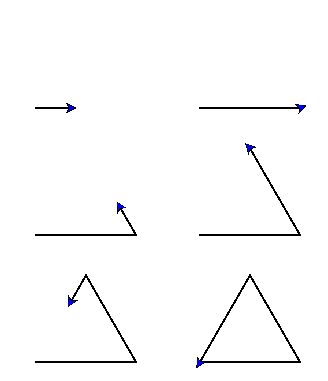
For example, to draw an equilateral triangle using do notation:
drawTriangle :: TurtleCommand ()
drawTriangle = do
  setHeading east
  forward 100
  left 120
  forward 100
  left 120
  forward 100
Which would produce:
Instances
| Monad TurtleCommand Source # | |
Defined in Graphics.WorldTurtle.Internal.Commands Methods (>>=) :: TurtleCommand a -> (a -> TurtleCommand b) -> TurtleCommand b # (>>) :: TurtleCommand a -> TurtleCommand b -> TurtleCommand b # return :: a -> TurtleCommand a # | |
| Functor TurtleCommand Source # | |
Defined in Graphics.WorldTurtle.Internal.Commands Methods fmap :: (a -> b) -> TurtleCommand a -> TurtleCommand b # (<$) :: a -> TurtleCommand b -> TurtleCommand a # | |
| MonadFail TurtleCommand Source # | |
Defined in Graphics.WorldTurtle.Internal.Commands Methods fail :: String -> TurtleCommand a # | |
| Applicative TurtleCommand Source # | |
Defined in Graphics.WorldTurtle.Internal.Commands Methods pure :: a -> TurtleCommand a # (<*>) :: TurtleCommand (a -> b) -> TurtleCommand a -> TurtleCommand b # liftA2 :: (a -> b -> c) -> TurtleCommand a -> TurtleCommand b -> TurtleCommand c # (*>) :: TurtleCommand a -> TurtleCommand b -> TurtleCommand b # (<*) :: TurtleCommand a -> TurtleCommand b -> TurtleCommand a # | |
Running a world of turtles.
For executing commands on multiple turtles, we use runWorld which
executes on WorldCommands. Here is an example where 2 turtles draw a
circle independently:
import Graphics.WorldTurtle

main :: IO ()
main = runWorld $ do
  t1 <- makeTurtle
  t2 <- makeTurtle

  t1 >/> circle 90
  t2 >/> circle (-90)
Notice that in a WorldCommand context we must create our own turtles with
makeTurtle! We them apply the TurtleCommand
on our turtles using the run operator (>/>).
Arguments
| :: WorldCommand () | Command sequence to execute |
| -> IO () |
runWorld takes a WorldCommand and produces the animation in a new
window!
Interacting with the window.
While running, you can interact with the window in the following way:
| Action | Interaction |
|---|---|
| Pan the viewport. | Click and drag |
| Zoom in/out. | Mousewheel up/down |
| Reset the viewport to initial position. | Spacebar |
| Reset the animation. | R key |
| Pause the animation. | P key |
| Quit | Escape key |
data WorldCommand a Source #
A WorldCommand represents an instruction that affects the entire
animation canvas.
This could be as simple as "make a turtle" or more complicated like "run these 5 turtles in parallel."
Like TurtleCommands, WorldCommands can be executed in order by
combining commands in order using the monadic operator (>>).
To execute a TurtleCommand in a WorldCommand, use either the
run function or the
>/> operator.
For how to achieve parallel animations see Graphics.WorldTurtle.
Instances
Arguments
| :: TurtleCommand a | Command to execute |
| -> Turtle | Turtle to apply the command upon. |
| -> WorldCommand a | Result as a |
run takes a TurtleCommand and a Turtle to execute the command on.
The result of the computation is returned wrapped in a WorldCommand.
For example, to create a turtle and get its x position one might
write:
 myCommand :: Turtle -> WorldCommand Float
 myCommand t = do
   (x, _) <- run position t
   return x
Or to create a command that accepts a turtle and draws a right angle:
myCommand :: Turtle -> WorldCommand ()
myCommand = run $ forward 10 >> right 90 >> forward 10
Arguments
| :: Turtle | Turtle to apply the command upon. |
| -> TurtleCommand a | Command to execute |
| -> WorldCommand a | Result as a |
This is an infix version of run where the arguments are swapped.
We take a turtle and a command to execute on the turtle.
The result of the computation is returned wrapped in a WorldCommand.
To create a turtle and draw a right-angle:
myCommand :: WorldCommand ()
myCommand = do
  t <- makeTurtle
  t >/> do
    forward 10
    right 90
    forward 10
Parallel animation
While WorldCommands can be combined with (>>) to produce sequential
instructions, we can also use the
alternative operator (<|>) to achieve parallel instructions. That is:
animate two turtles at time!
Here is an example:
 import Graphics.WorldTurtle

 main :: IO ()
 main = runWorld $ do
   t1 <- makeTurtle' (0, 0) north green
   t2 <- makeTurtle' (0, 0) north red

   -- Draw the anticlockwise and clockwise circles in sequence.
   t1 >/> circle 90 >> t2 >/> circle (-90)

   clear

   -- Draw the anticlockwise and clockwise circles in parallel.
   t1 >/> circle 90 <|> t2 >/> circle (-90)
Which would produce an animation like this

Note that the result of x <|> y is:
>>>x <|> yx
when x is not empty, otherwise the result is y.
(<|>) :: Alternative f => f a -> f a -> f a infixl 3 #
An associative binary operation
Stop an animation
If a WorldCommand is empty, then this stops this
section of animation and it does not progress. To this end
guard can be used to calculate when to stop part of an
animation sequence.
empty :: Alternative f => f a #
The identity of <|>
Further documentation
module Graphics.WorldTurtle.Shapes
module Graphics.WorldTurtle.Color